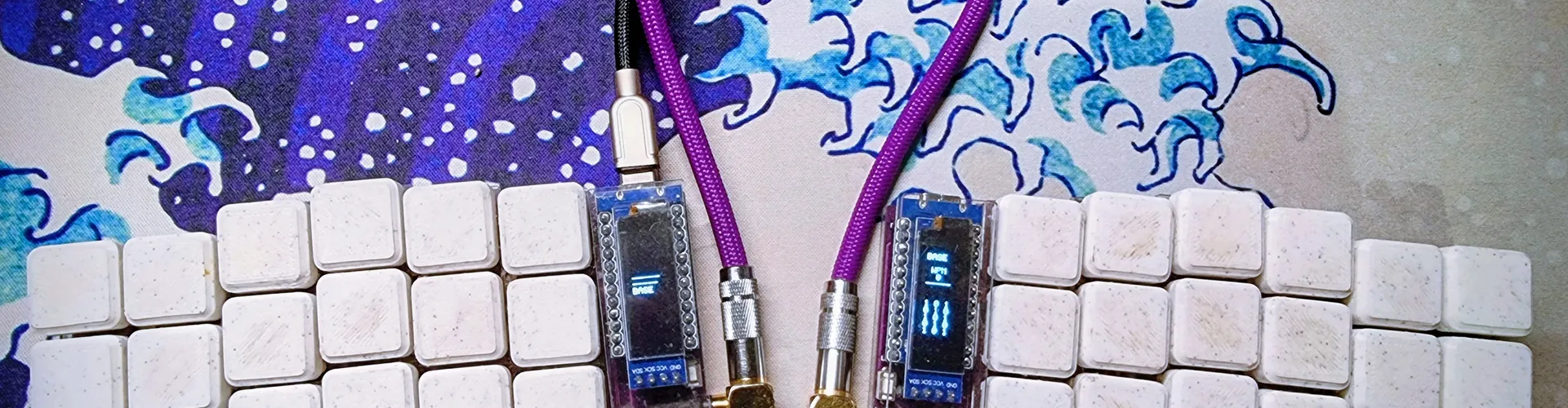
About a year ago, I decided it was time to move from my mechanical, cheap keyboards to something fancier.
While I love the clicky sounds of mechanical keyboards, I was missing something: I code for long hours, and my back and neck hurt a lot, not because of the keyboard, but it had something to do with it.
When my last keyboard started to fail, I found a Spanish builder of Corne Keyboards (unfortunately the shop closed a few months ago). The corne got my attention because it is a split keyboard and I thought that it would help me to relax my back, as I could have my arms in a more natural position while typing. Thus, I got one!
When the keyboard arrived, I was really excited to test it, but, as with any big change, I was going to suffer a lot in the beginning. Why? Because it is an ortholineal keyboard (the keys are just one finger away in up, down, left, and right directions) and you need to learn the new positions while you adapt. Moreover, I type in Spanish, but I also write in English, so chars like Ñ were difficult in the first place :-)
The first stages with the keyboard
As you start adapting to the keyboard, you discover you can flash different configurations into it. Why would you want to flash a firmware to your keyboard? Well, I'm glad that you have asked that question; you want to do it because you can customize it for yourself. More importantly, as this keyboard has fewer keys than a normal keyboard, you need to enable "layers" that allow you type them (layers are what you enable in your Android or iOS phone to type numbers, symbols, etc.).
The first approach for this flashing is connecting your keyboard to a web page where you can modify the keys by clicking and typing some commands. At the beginning, this works, but at some point, while you read what your keyboard and others are doing, you say fuck it, I will do it by actually compiling some C code. What could go wrong, right?
The Enlightenment phase
It turns out that compiling your QMK firmware isn't that difficult. The documentation site is amazing, and you only have to RTFM, and play along.
At this moment, I was actually hacking the firmware of my keyboard almost every single day. As you can now improve every single aspect of it, you end up looking for hacks and improvements to maximize your WPM while having the best typing experience.
First hacks
The first thing I did was turn off all the lights. I don't know how people can type with so many bright lights; they're distracting to me.
The next hack was handling the symbols: , (), {}. With QMK, you can make it so that when you type just {, it writes that curly brace, but if you type it twice quickly, it actually types }. The same for all the symbols, so you could save one character from your keyboard if you remember this hack.
As you can imagine, and I don't want to write all the changes I made, I was changing this behavior here and there until I had something I felt good about.
My keyboard meets AI
While I was fine with the current setup for my keyboard, I realized that the code was pretty small, only 3 files that you touch, they are easy to understand, and due to the constraints of my keyboards's memory I cannot do too many fancy stuff.
In any case, while I have not been compiling the firmware for some weeks, I had some keys and combos that didn't work out as I wanted, so I thought: what if I give my files to Gemini, ChatGPT, or Claude to get some improvements? So I started with ChatGPT.
ChatGPT
NOTE: This test was run before November 2025.
With ChatGPT, it was just a disaster. I copied and pasted the layout with all the layers, my old animations, etc., and the recommendations were bad, really bad.
The AI didn't know which keys were in which hand; it gave me solutions to press two keys with the same finger, making the combo impossible, etc.
It was that bad that I didn't use it at all.
Gemini
With Gemini, I had the same experience as with ChatGPT. It didn't work well because it was mixing all the keys and giving me advice that didn't work.
Thus, I just gave up as I was better on my own.
Now fast forward to Feb 2026.
Claude
I started paying Claude in January 2026 to update my old website (where you are reading this blog post, I assume). I will write about this experiment in another blog post because I have a lot to share. The best part? My site was using a very old version of VueJS and NuxtJS with external JS libraries that are non-existent right now in npm, and updating it to the latest versions of everything will be a nightmare.
Well, back to my keyboard. This time, I have been extensively using Claude for coding, asking questions, and fixing stuff here and there, and I said, "Let's try it again." Specially because I'm using a Mac at work and I have installed a tiling window manager (hello AeroSpace), so I was thinking of ways of improving my keyboard firmware to better serve me using AeroSpace.
At the beginning, I asked Claude what I could remove from my AeroSpace, as some of them were there for testing and I probably wasn't using them. The suggestions came in, I removed them, and I was happy, then I thought: what if I tell Claude that I have a corne keyboard and I upload my C files so Claude can help me? Well, if you want to know the answer, follow me on this adventure.
Cleaning up the code
The first part was asking for some suggestions, and Claude suggested some nice fixes for my code. They were nice suggestions, so I asked Claude to fix them for me. The files came in, and the compilation went smoothly. Easy peasy, first impression is good.
Then, I asked Claude about the animations and what I wasn't using because of the configurations in my files. Well, Claude found all the issues and suggested proper fixes for me. All of them worked like a charm.
As everything was working, I thought: what if I explain to Claude my problems with the current layout and see what Claude suggests?
Breaking the code
At this stage, I explained to Claude: I'm a Spanish person, so my keyboard has to be in Spanish, but I write in English as well. Take this into account because the ñ must exist by default in my keyboard (the C files explicitly use the Spanish layout, so the code already tells you this, ok?). Then I said, "What can I improve with the current layouts? What do you suggest?"
The first suggestions were to remove some keys in some layers that I have duplicated (in most cases, from my experiments to see how a specific code works). I asked Claude to fix them by removing them, and this worked well.
Then I asked for other improvements, and Claude started doing stupid things.
The most frustrating part was to know that Claude had all the layers and code, so everything was there for Claude to explore and improve; however, after each improvement, Claude was removing keys to fit other keys from its improvements. Claude didn't know which letters were on the left hand or in the right hand, even though the code clearly states that. After several errors and my frustration I told Claude to tell me which keys are on the left and which are on the right, and that the number of keys I have available is not the number of keys on a regular keyboard. Yep, Claude couldn't get this right on its own.
After working on this for some time, Claude finally started to make sense again, and the suggestions started to work again. Actually, the layouts I'm using have been reorganized by Claude, and they work well (I'm still adapting to them, but so far, so good).
With the layers in place, I wanted to try something different: what can Claude do with the OLED screens? Can Claude make them more useful?
Playing with OLED screens
My previous designs were simple: on the left screen, a design with 4 layers to show in which layer I'm in while I'm typing, and on the right side, some icons, nothing fancy.
While the layer design is nice, I asked Claude what can be done to improve it. Claude suggested adding a WPM counter. I thought that it was a good idea, so I asked Claude to design something so I could try it. Claude suggests creating an oscilloscope to display WPM, and it is a good idea. Actually, Claude suggests creating a web page to show me the designs, so I can validate before flashing the firmware.
As I liked what Claude showed me, I decided to ask for something more complex: what if you could design it like an old sci-fi film, like Alien's Mother computer, Tron, or Star Trek?
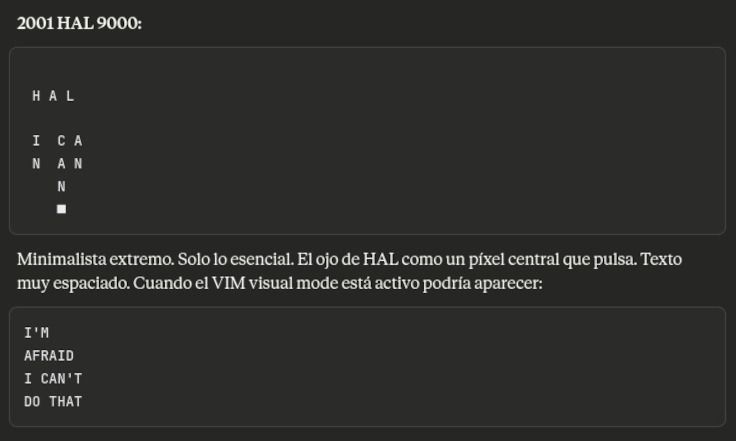
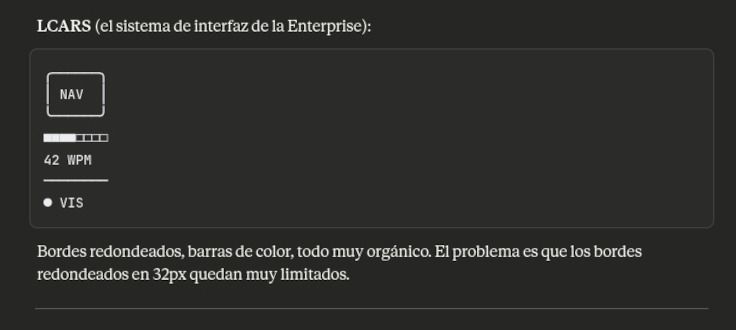
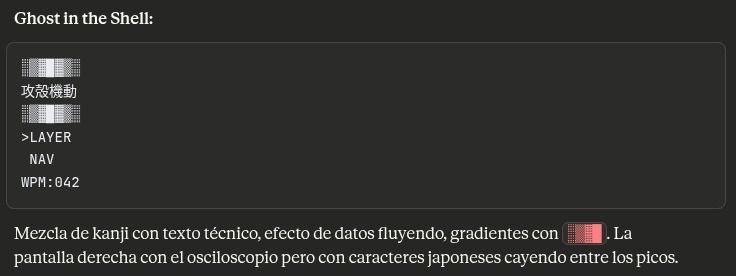
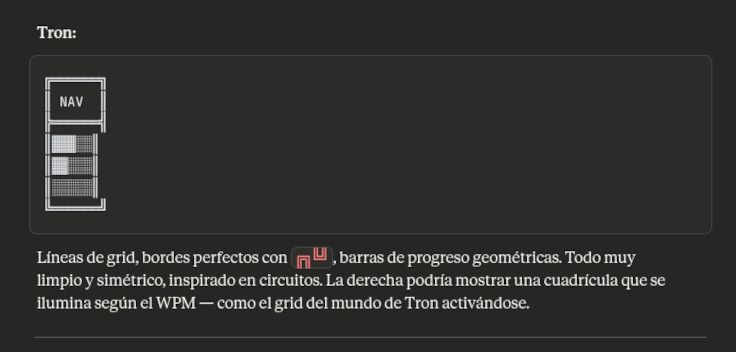
The first designs were ok because the mockups looked good. Actually, some of them look promising. At this moment, it might be possible to use a custom font to make things more interesting. The answer was yes, but at what cost? I shared two Google fonts, so Claude could work with them. The reality and the mockups were harsh. Moreover, I own a Garmin, and since it has an MFT screen, the designs available for this watch are, in general, amazing, so I uploaded some screenshots of themes I like as inspiration. Here you have two of the themes that Claude created for me:
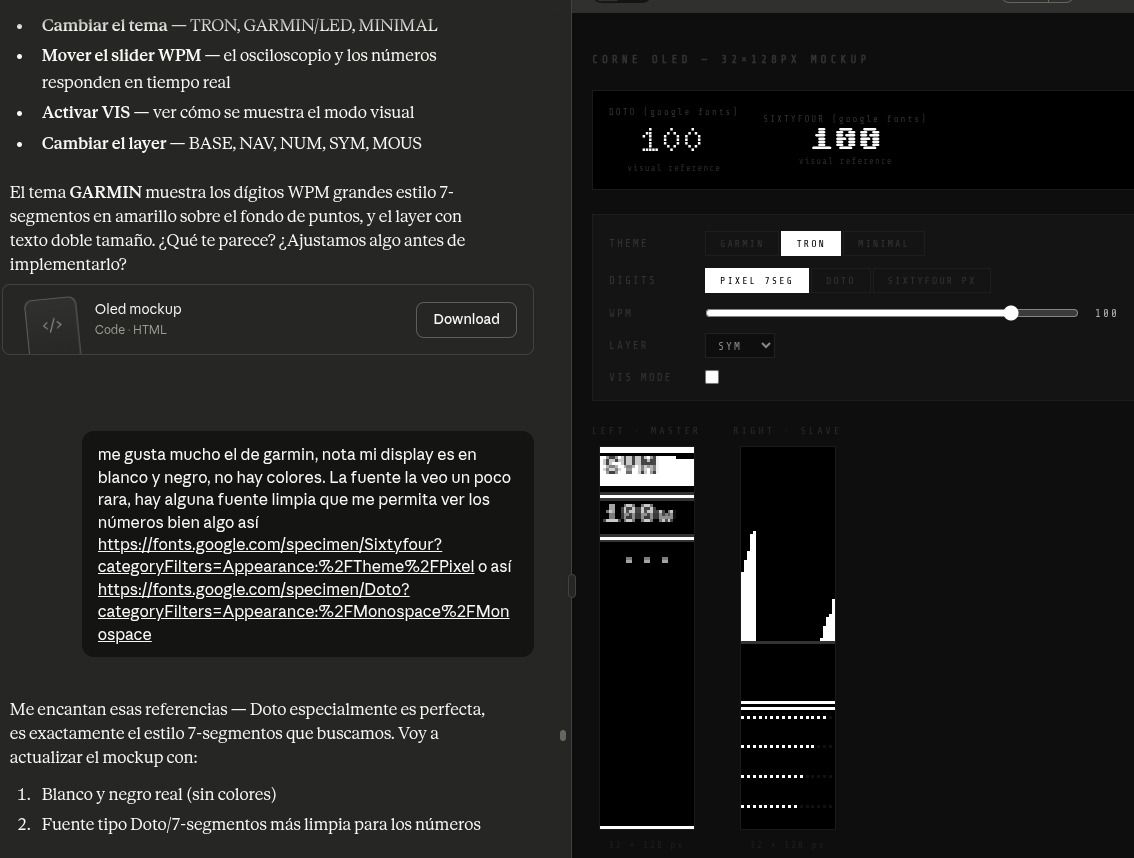
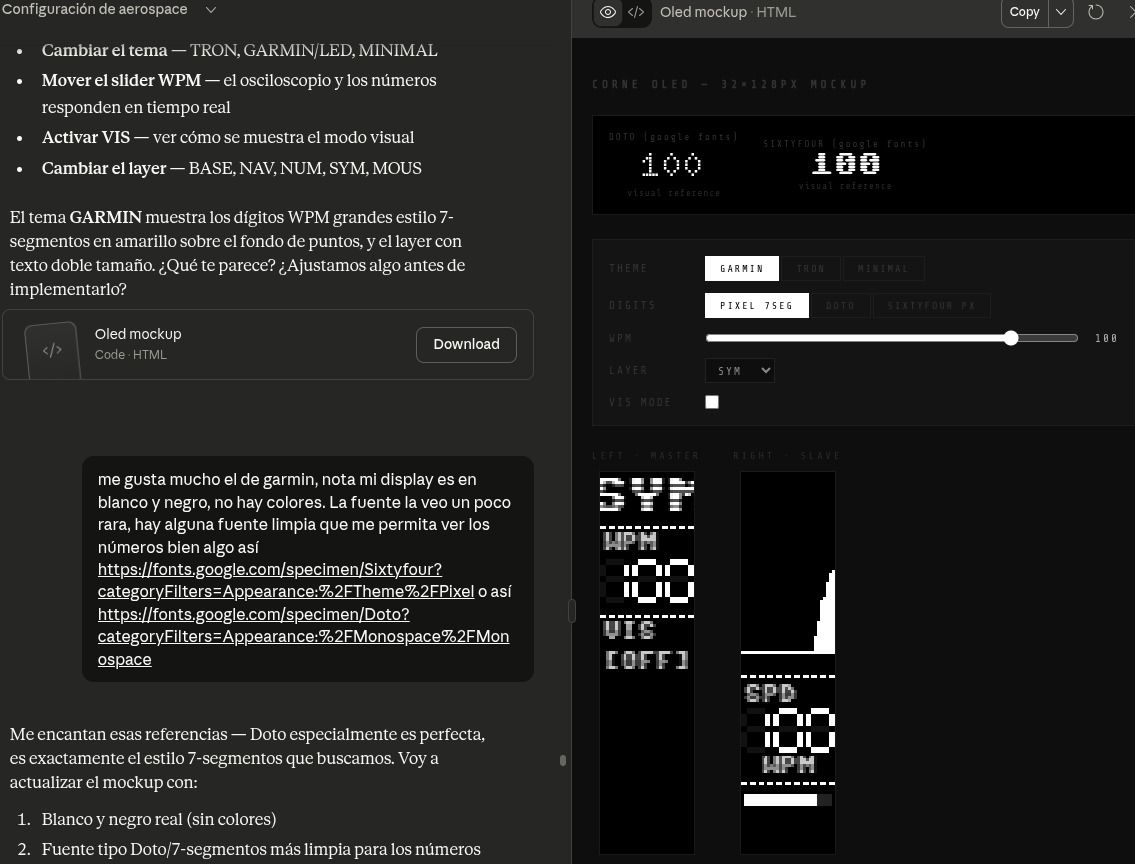
While Claude thought everything worked as expected (the mockups showed something working more or less), in the real OLED display, only some characters used the real font. At the same time, the rest kept using the QMK firmware font.
Interestingly, I discussed a lot with Claude about this, and we finally got something that somehow worked (I gave up on getting the font everywhere). With the font looking good enough, I decided to use it in the WPM. Bad decision.
The WPM was designed by Claude as an oscilloscope: the faster you type, the bigger the signal, so you can see how fast you type, as the bars go up and down as you write. The first design worked really well, pretty basic, but well. Then I asked Claude to make it a bit different, use the font we worked on together, and put the chart on top. This is when things got messy: the font started to overwrite itself all the time, leaving blank spaces in the characters.
For me, it was clear that the problem was related to the OLED display's refresh, but Claude was not sure. Claude invested a lot of time trying to fix it, only to end up with a solution that was too ugly and expensive to use. The AI suggested using a bigger font, so it could render it properly, but while it looked good, the design was bad, really bad, so I asked Claude to completely ditch it. The following screenshot is where you can see Claude thinking and trying hard to solve the problem:
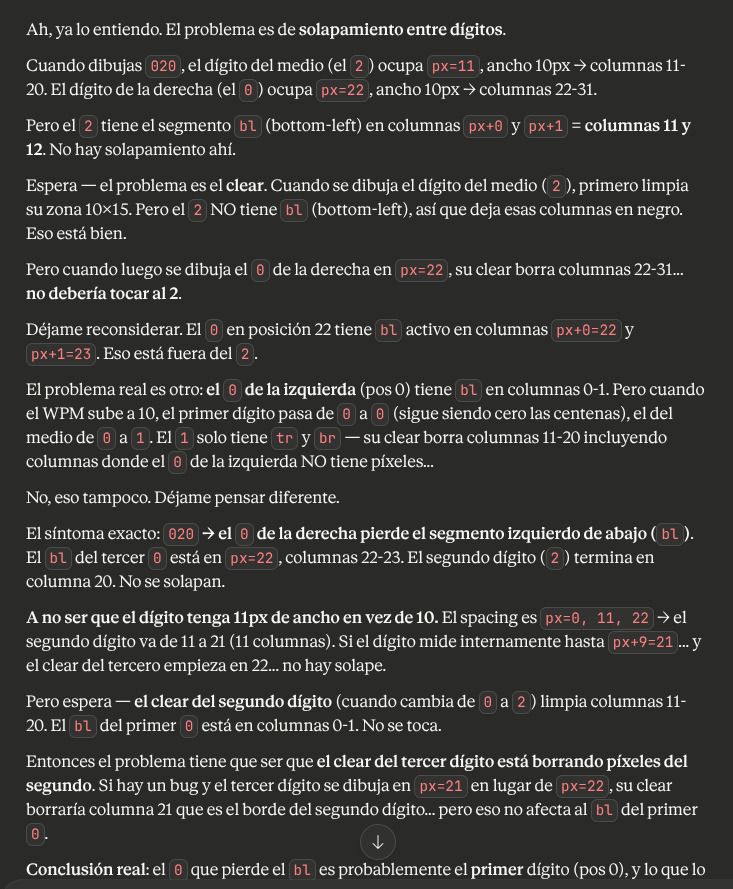
At the end, the real cause of this problem was that Claude used two different rendering systems, fighting to write characters to the screen.
Up to this moment, I was working only on one screen, but the other one should work as well and should show something: the layer, the wpm, something. I asked Claude to add something simple, and it suggested showing the layer name and the wpm without the oscilloscope. I compiled the firmware, flashed it, and discovered that nothing happened. The display showed the text, but when I typed, nothing changed, and if I changed the layer, nothing was reflected. I told Claude about it, and Claude started to think about where the problem could be. At some point, it suggests that the problem was related to having a split keyboard -seriously- so it suggests adding one config to fix it. It actually fixes it, but it is incredible that after having the code, telling Claude that I have a corne, which is a split keyboard, Claude does not realize anything like this.
The good, the bad, and the ugly
While I had suffered Claude, and with Claude, the truth is that it works. Using AI to build firmware that the LLM cannot test on real hardware is a problem. When you develop with AI, you should use some tests to allow the AI to know what's working, what's not, so you can avoid future problems when it hallucinates. Because that will happen (I have been there).
But even with these problems, it has created a smooth animation for my keyboard that would have been really difficult for me to do on my own. Also, it has suggested some configurations that I would not have thought about, so all this thinking out of the box pays off to some extent. Also, it is fun, really fun, to develop like this.
The biggest problem was with the custom font. Claude tried as hard as possible, actually taking minutes to think and correcting itself several times. It contradicted, fixed, and wrote the same conclusions, finally offering a solution that worked, somehow, but was suboptimal. Even with this big problem, it was fun to watch it discussing with itself while I was afraid of all the tokens it was burning (knowing that the answer was going to be bad).
Will I use the Claude again for this? Yes, for sure. And I'm planning to add some skills as well, because my configuration has some quirks and needs to remember them. Is it ready for everyone? Nope, not yet, especially if you are using the keyboard yourself every day, you still need to read the code, tell Claude where things are wrong, what keys and suggestions do not work because it is suggesting something impossible, or because it breaks your compilation completely. But it is fun, and it works if you know what you are doing.
This experience has been really useful. Using AI gives you super-powers, as you can try more things, learn more things, and improve what you do. But don't get me wrong, you need to be the one leading, as some crazy ideas will be thrown at you.
While I have been using Claude for other software projects, building firmware with it is quite different. Not having a way for the AI to test what happens in the hardware is a problem, as it cannot check what's going on, see errors, and fix them. For my keyboard, the AI would need a webcam to check the OLED designs, a robotic hand to type and verify that everything works, and, more importantly, to deal with my Homerow configuration, which is not easy to manage.
In summary, Claude has been and remains really useful. It has its issues, but that's fine.
Here you have two videos about how the oscilloscope works and how layers switch. At the end, I didn't use any of the original themes, and I kept a simple list of 1s and 0s to look like the Matrix. This time, simplicity won out. However, I might change it later, as the Ghost In the Shell and LCARS designs look good again to me after writing this blog post :-)